Click the Training builder  icon in the navigator to activate the training builder.
Step 1: Activate the workout builder
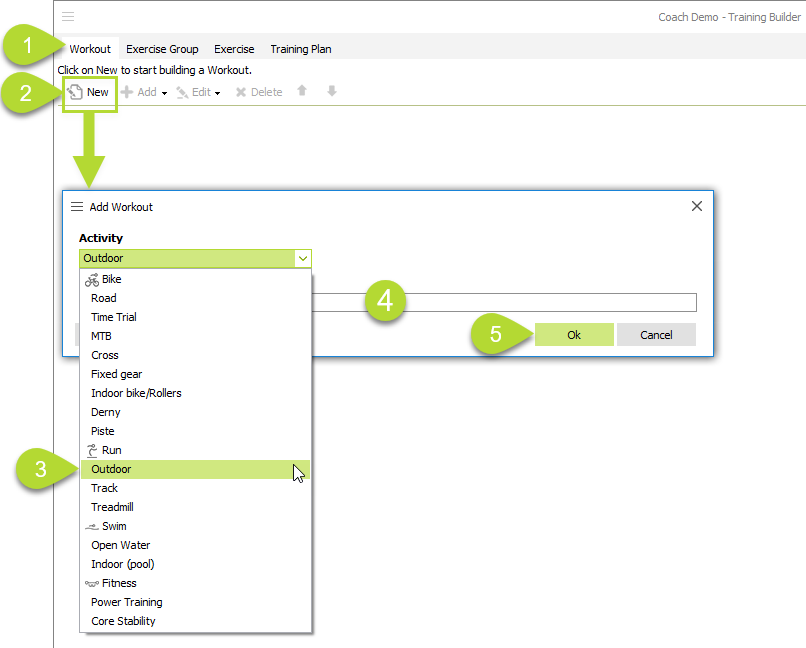
- Click the Workout Tab in the top left.
- Click New. A pop-up appears.
- Select an Activity.
- Fill in the Workout description. Keep in mind that this description will be the header of a planned workout in the athlete calendar.
- Click Ok.
- The 'Workout header' appears in the editor.You can start now building up your workout.

Step 2: Build up the workout
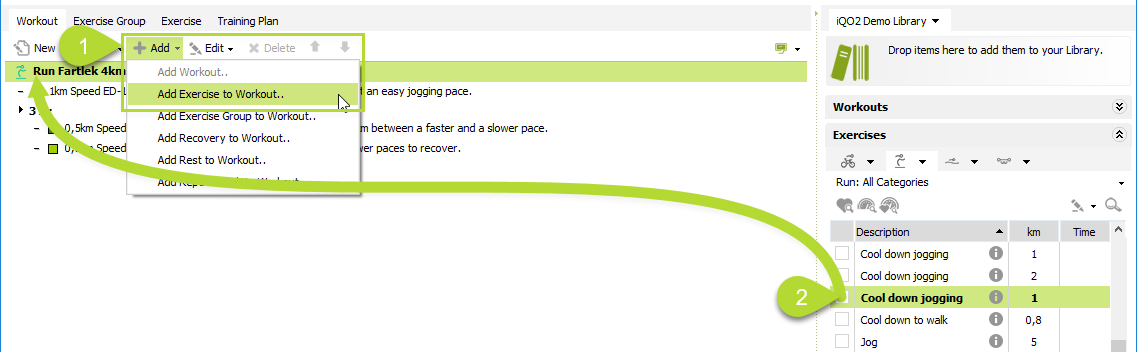
Method  : Build-up a workout from scratch
- Click on the 'Workout header'
- Click Add;
- Choose an option from the submenu to build up the workout. more info
Method  : Build up a workout using the exercise & exercise group library
Drag & drop exercises & exercise groups from the library to the 'Workout header' in the editor. more info
Step 3: Save the workout to the library
Method : Drop-box
- Click on the Workout header in the editor.
- Drag and drop the it in the drop-box.
- Enter/Review the workout description and/or extra library information (optional).
- Click Ok.
- The workout is saved to the library.

Method : Toolbar
- Click on the Workout header in the editor.
- Click the Save button.
- Select Save Workout to Library in the submenu.
- Enter/Review the workout description and/or extra library information (optional).
- Click Ok.
- The workout is saved to the library.

Comments